Docker Port Mapping
The Concept of Port Mapping
Containers are isolated by default. If a web server runs inside a container on port 80, the outside world (including the Docker host) cannot access it.
To make a container's service accessible, you must map (publish) a port from the Docker host to a port inside the container using the -p flag.
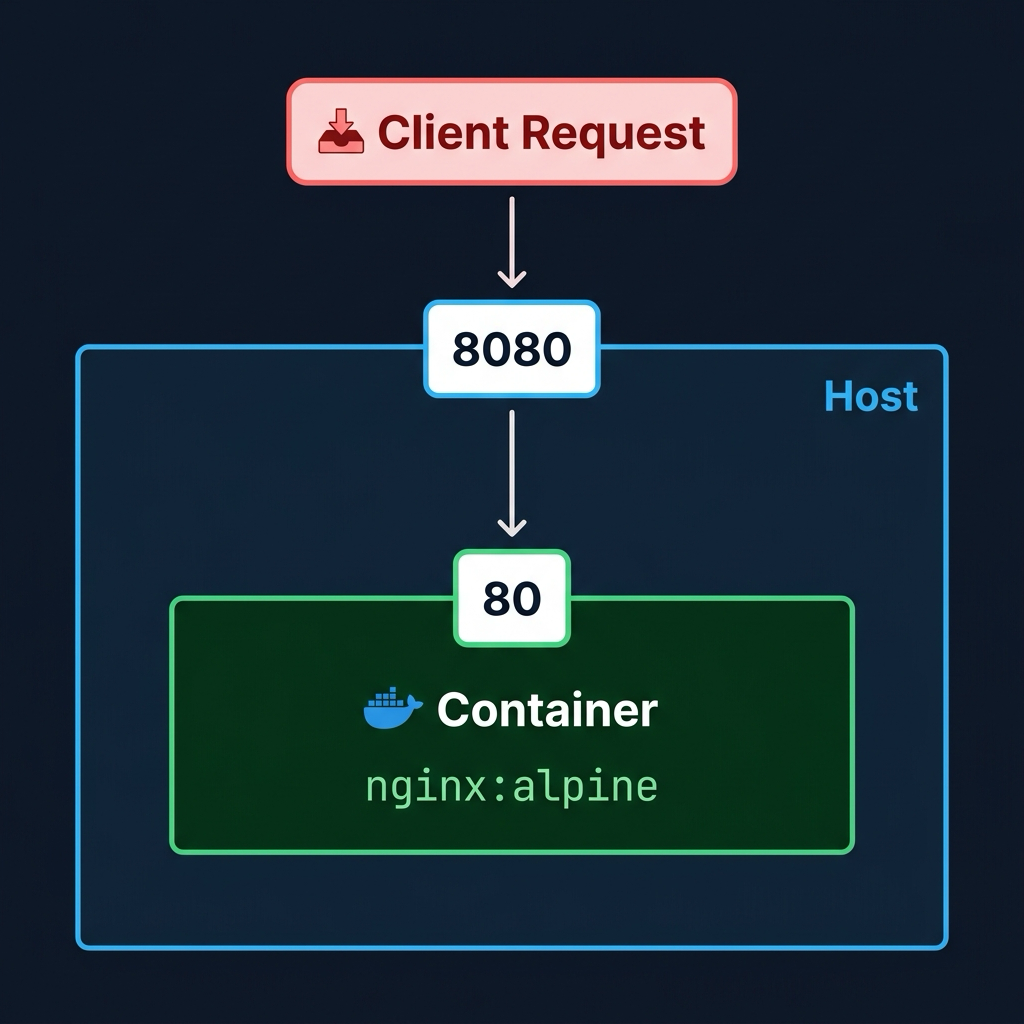
Run docker run -d --name web -p 8080:80 nginx:alpine to start an NGINX web server, mapping the host's port 8080 to the container's internal port 80.
[labuser@container ~]$ docker run -d --name web -p 8080:80 nginx:alpine
Unable to find image 'nginx:alpine' locally
alpine: Pulling from library/nginx
...
f1g2h3i4j5k6l7m8n9o0p1q2r3s4t5u6v7w8x9y0z1a2b3c4d5e6f7g8h9i0j1k2
Once the container is running, open http://localhost:8080 in your web browser. You will see the NGINX welcome page running inside your container!
Dynamic Port Mapping
If you deploy many containers, managing static ports like 8080 manually can lead to collisions. Docker can automatically assign an available random high port on the host to your container using the uppercase -P flag.
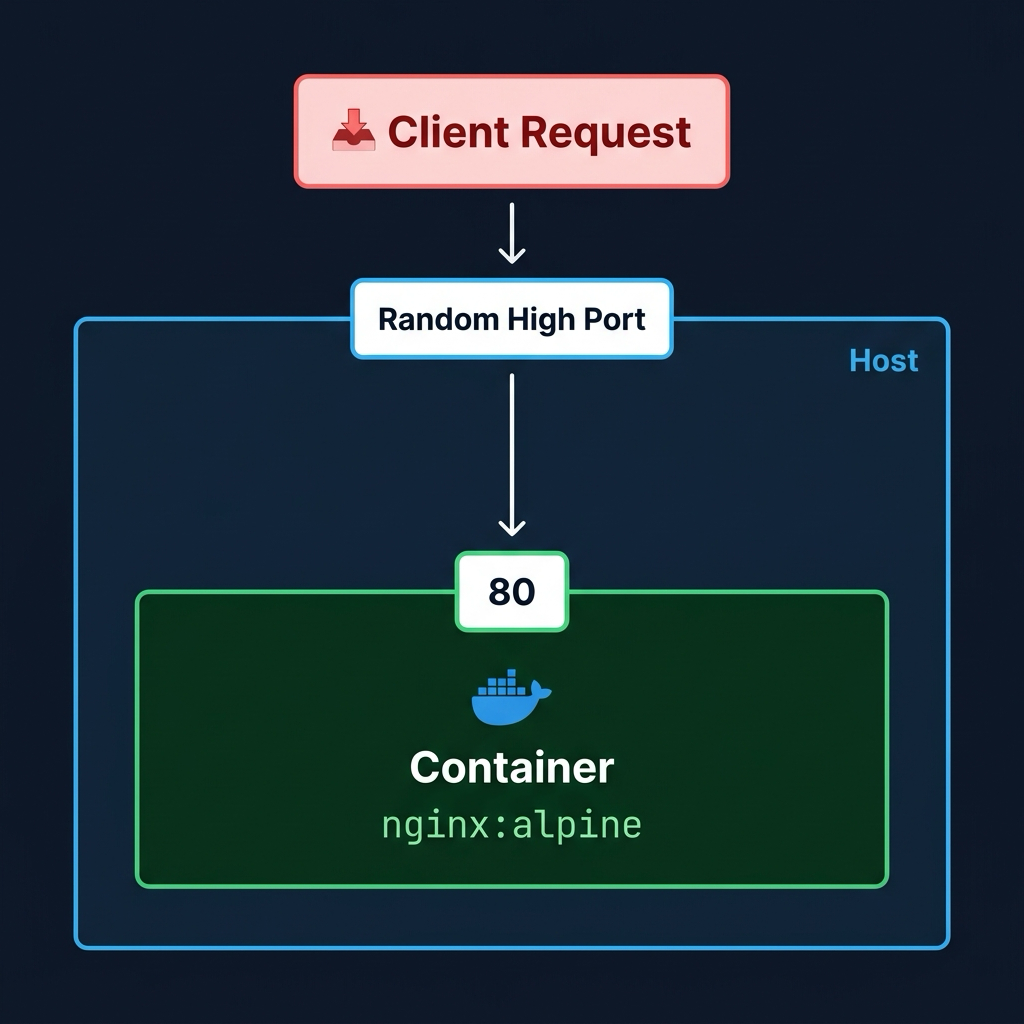
Run docker run -d --name web-dynamic -P nginx:alpine.
[labuser@container ~]$ docker run -d --name web-dynamic -P nginx:alpine
a1b2c3d4e5f6g7h8i9j0k1l2m3n4o5p6q7r8s9t0u1v2w3x4y5z6a7b8c9d0e1f2
Note that you didn't specify numbers. Docker automatically looked at the EXPOSE instruction in the NGINX Dockerfile (which exposes port 80) and assigned a random host port to it.
Here's the relevant part of the official nginx:alpine Dockerfile:
# nginx:alpine Dockerfile
EXPOSE 80
This tells Docker: "this container listens on port 80". When you use -P, Docker reads this and automatically maps a free host port to it.
Inspect Dynamic Ports
To find out which random port Docker assigned, you can use the docker port command.
Run docker port web-dynamic.
[labuser@container ~]$ docker port web-dynamic
80/tcp -> 0.0.0.0:32768
80/tcp -> [::]:32768
Note the assigned host port (e.g., 0.0.0.0:32768).
Run docker ps to see which random host port Docker assigned to the container's internal port 80 (look under the PORTS column).
[labuser@container ~]$ docker ps
CONTAINER ID   IMAGE          COMMAND                  CREATED          STATUS          PORTS                                     NAMES
a1b2c3d4e5f6   nginx:alpine   "/docker-entrypoint.…"   2 minutes ago    Up 2 minutes    0.0.0.0:32768->80/tcp, :::32768->80/tcp   web-dynamic
f1g2h3i4j5k6   nginx:alpine   "/docker-entrypoint.…"   15 minutes ago   Up 15 minutes   0.0.0.0:8080->80/tcp, :::8080->80/tcp     web
Open http://localhost:32768 (or the specific port assigned on your system) in your browser to confirm the dynamically mapped container is serving traffic!
🧠 Quick Quiz
What is the correct syntax to map port 8080 on your host to port 80 inside the container?
What does the -P (uppercase) flag do when running a container?
How can you quickly check which ports are currently mapped for a specific running container?
Practice Live in Your Browser
Don't just read about Docker commands—execute them in real time! Launch a fully-configured, secure Docker sandbox directly in your browser. Practice commands, debug broken containers, and complete timed challenges with instant task validation.
📬 DevopsPilot Weekly — Learn DevOps, Cloud & Gen AI the simple way.
👉 Subscribe here